


Every AWS bill is really a bill for one of a few things. Networking bills you for movement, the packets crossing your boundaries. Storage bills you for inertia, the bytes sitting still. Compute bills you for potential, the capacity you provisioned whether you use it or not. AI bills you for context, the tokens you feed the model.
And databases, the subject of this guide, bill you for something subtler and more expensive than all of them: state. The one thing nobody wants to touch.
Databases are the sacred cows of cloud infrastructure. Because data loss and production downtime carry severe business risk, engineering teams rarely touch running database configurations. Instead, they over-provision compute “just in case,” ignore legacy storage volumes, and treat unpredictable storage I/O charges as an unavoidable cost of doing business.
Below are three of the most common Amazon RDS and Aurora cost traps, each with the exact fix. None of them requires compromising reliability.
A short “also worth checking” list at the end covers the larger levers that deserve their own deep dive.
The Aurora I/O Variable Tax (Standard vs. I/O-Optimized)
When deploying Amazon Aurora (PostgreSQL or MySQL), the default configuration is Aurora Standard.
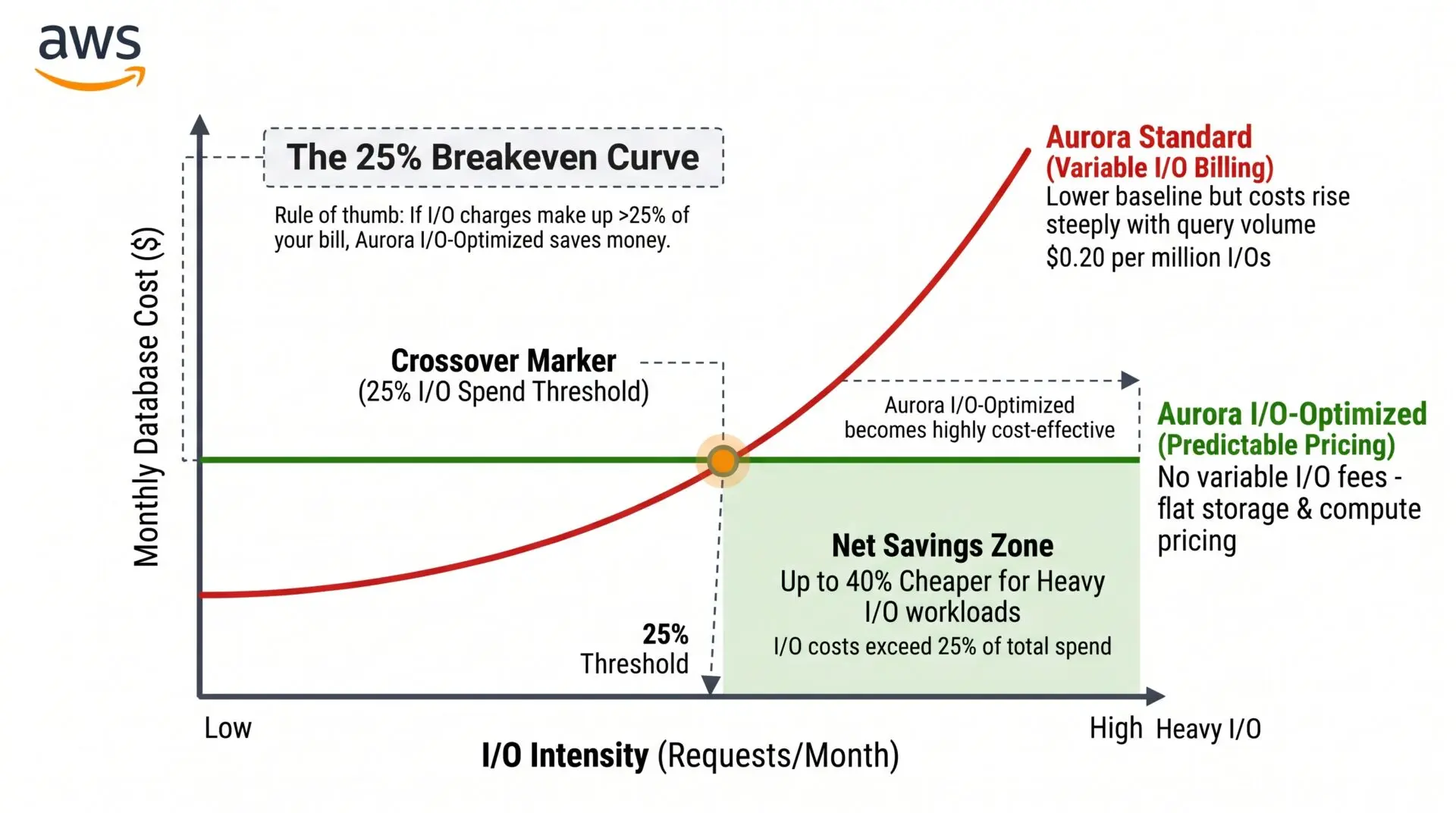
Aurora Standard separates compute from storage, charging for instances, allocated storage, and every single storage I/O operation at roughly $0.20 per million requests. For write-intensive workloads, high-frequency transaction logging, or reporting systems scanning unindexed tables, I/O charges fluctuate wildly and can quietly outgrow the compute bill itself.
Aurora I/O-Optimized raises compute instance costs by approximately 30% and storage costs by 125%, but it completely eliminates per-request I/O charges ($0.00 per I/O). AWS markets this as “up to 40% savings for I/O-intensive workloads,” and the heuristic they publish alongside it is a useful one: if your I/O charges exceed roughly 25% of your total Aurora spend, I/O-Optimized tends to come out ahead.
Treat the “up to 40%” as a best case, not a promise; your actual savings depend on how I/O-heavy you really are.
The Fix: The I/O-Optimized Upgrade
First, confirm you actually clear the bar. The fastest way is AWS Cost Explorer filtered on the Aurora:StorageIOUsage usage type.
That line against your total Aurora spend gives you the I/O-share percentage directly, without reconstructing it from CloudWatch VolumeReadIOPs/VolumeWriteIOPs metrics.
If I/O is above ~25% of the cluster’s bill, switch the cluster storage type to aurora-iopt1. The switch is an online cluster-config change with no data migration, but know two limits before you flip it:
- You can switch to I/O-Optimized only once every 30 days. (Switching back to Standard is allowed at any time)
- There are minimum engine versions (Aurora PostgreSQL 13.10+ / Aurora MySQL 3.03+)
resource "aws_rds_cluster" "production_db" {
  cluster_identifier = "production-aurora-cluster"
  engine             = "aurora-postgresql"
  engine_version     = "16.4"

  # FinOps Fix: Eliminates all $0.20/M I/O request fees on heavy transaction workloads.
  # Note: switching TO io-optimized is limited to once per 30 days.
  storage_type       = "aurora-iopt1"
}
Aurora Serverless v2 “ACU Floor” Creep
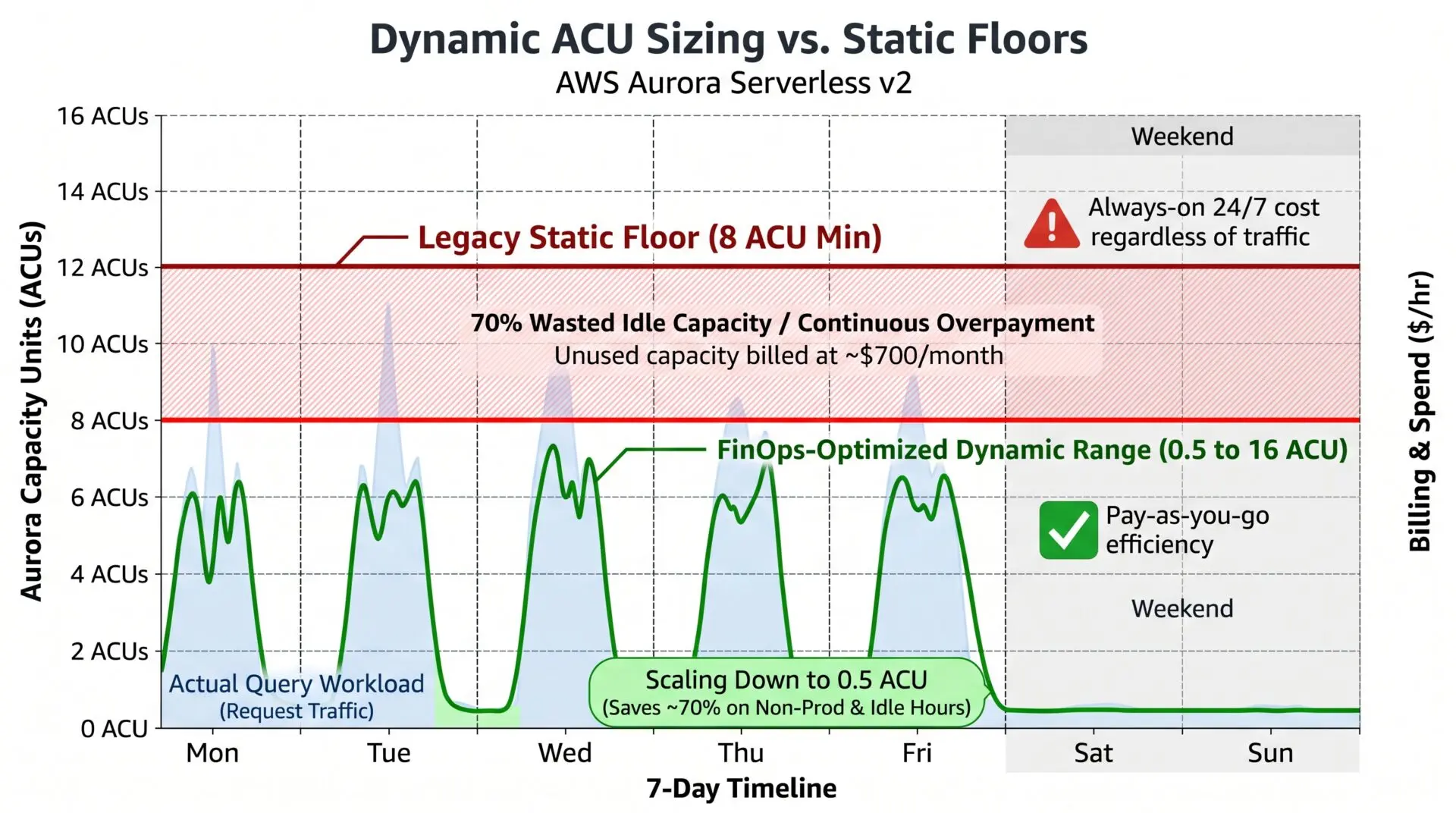
Amazon Aurora Serverless v2 scales compute dynamically in increments of 0.5 Aurora Capacity Units (ACUs), where 1 ACU provides approximately 2 GiB of RAM, corresponding CPU, and network bandwidth at roughly $0.12 per ACU-hour.
Engineers configuring Serverless v2 often set the minimum ACU capacity (min_capacity) unnecessarily high (for example, 8 or 16 ACUs).
The usual reason is not simple caution: Serverless v2 scales up faster from a higher current capacity, so teams raise the floor to avoid a sluggish ramp under sudden load. The problem is that a high floor bills continuously whether or not that headroom is ever used.
An idle minimum of 8 ACUs translates to a substantial fixed floor: 8 ACUs × $0.12/hour × 730 hours ≈ $700.80/month
This charge accrues continuously, even in development, staging, or internal QA clusters that sit completely untouched outside business hours.
The Fix: Minimum Capacity Right-Sizing
For non-production environments that sit idle outside business hours, set min_capacity to 0 ACUs.
Since November 2024, Aurora Serverless v2 supports scaling to zero with automatic pause and resume: after a configurable idle period with no active connections, the cluster pauses and compute billing drops to $0 (you still pay only for storage).
The first new connection resumes it automatically, at the cost of a brief cold-start of a few seconds.
Two things decide whether scale-to-zero actually works for you:
- The cluster only pauses when nothing is connected. In practice, a single persistent connection keeps it awake forever: connection pools, monitoring agents, RDS Proxy, a replica, or a scheduled health check will all prevent the pause. Audit what is holding a connection open before you expect the bill to drop.
- It requires a recent engine version (for example Aurora PostgreSQL 16.3+). An older version with min_capacity = 0 returns an error. The example below pins a version that supports it.
That still beats the old 0.5 ACU floor, which keeps the cluster warm but bills ~$43.80/month per cluster even when completely untouched.
For production and latency-sensitive environments where even a few seconds of cold-start is unacceptable, keep a non-zero floor (0.5 ACU or higher) and test reducing it while monitoring your buffer-cache hit ratio.
Downsizing compute shrinks the memory cache (innodb_buffer_pool_size on MySQL; shared_buffers on PostgreSQL), so right-size your minimum to match your warm-cache baseline, not peak traffic.
# Set a non-production Aurora Serverless v2 cluster to scale to zero when idle.
# Requires a recent engine version (e.g. Aurora PostgreSQL 16.3+) and NO
# persistent connections (pools, RDS Proxy, monitoring) holding it awake.
aws rds modify-db-cluster \
  --db-cluster-identifier "staging-aurora-cluster" \
  --serverless-v2-scaling-configuration MinCapacity=0,MaxCapacity=16 \
  --apply-immediately
The Legacy RDS Storage Tax (io1 and Oversized gp2 vs. gp3)
Thousands of enterprise Amazon RDS instances (running standard MySQL, PostgreSQL, or SQL Server) still run on legacy gp2 or over-provisioned io1 storage volumes.
The waste here is real, but it is worth being precise about where it comes from, because the RDS numbers differ from the EBS numbers people often quote.
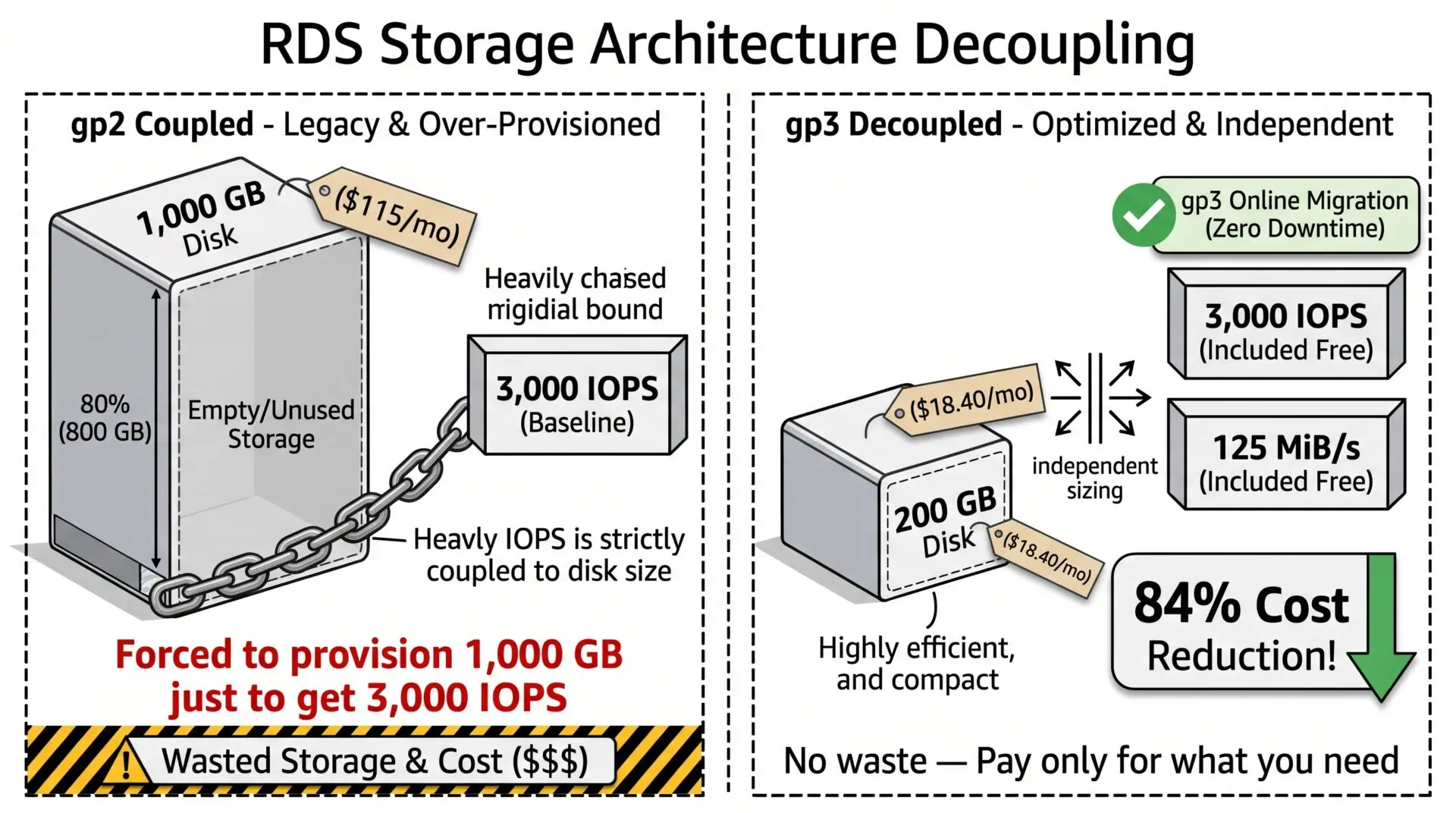
On RDS, gp2 ties IOPS performance directly to provisioned storage volume size (3 IOPS per GB). If a database needs 9,000 IOPS for query spikes, gp2 forces you to provision a 3,000 GB volume to reach it, even if you only store 50 GB of data. You are buying capacity you will never fill purely to unlock performance.
The io1 path avoids that coupling but is expensive in its own right: on RDS, provisioned IOPS are billed at roughly $0.10 per IOPS-month (note: this is the RDS rate, not the ~$0.065 EBS rate), on top of the per-GB storage charge.
A few thousand provisioned IOPS adds up to hundreds of dollars a month before you store a single row.
The Fix: Modernize to RDS gp3
Amazon RDS gp3 decouples storage capacity from performance. Two things to get right, because both are commonly misstated:
- Per-GB cost is the same on RDS. Unlike EBS (where gp3 is ~20% cheaper per GB than gp2), on RDS gp3 and gp2 cost about the same per GB (~$0.115/GB-month in us-east-1). The RDS savings do not come from a cheaper per-GB rate; they come from no longer oversizing the volume just to get IOPS, and from retiring expensive io1 provisioned IOPS.
- The free baseline depends on volume size and engine. For MySQL, PostgreSQL, and MariaDB, gp3 volumes under 400 GiB include a baseline of 3,000 IOPS and 125 MiB/s; volumes at or above 400 GiB get a higher striped baseline of 12,000 IOPS and 500 MiB/s. (Oracle uses a 200 GiB threshold; SQL Server stays at 3,000 IOPS.) Above the baseline you pay for additional IOPS/throughput.
One critical caveat the headline “just switch to gp3” advice usually omits: moving to gp3 does not shrink an oversized volume.
RDS modify-db-instance can increase allocated storage but cannot reduce it. The Allocated storage setting is one-way.
So converting that 3,000 GB gp2 instance to gp3 stops you paying the IOPS-coupling penalty going forward, but it does not reclaim the capacity you over-bought.
To actually reduce allocated storage you need an RDS Blue/Green deployment (which has supported storage shrink since November 2024, though with real-world limitations worth testing first) or a dump-and-restore into a smaller instance.
# Switch an RDS instance to gp3 online, with no downtime.
# This changes the storage TYPE (and stops the gp2 size-for-IOPS tax going forward).
# It does NOT shrink allocated storage: modify-db-instance cannot reduce it.
# To reclaim over-bought capacity, use a Blue/Green deployment or dump-and-restore.
aws rds modify-db-instance \
  --db-instance-identifier "production-relational-db" \
  --storage-type gp3 \
  --apply-immediately
Also Worth Checking
The three traps above are quick, in-place wins. But the largest database line items on a mature AWS bill usually sit elsewhere, and each deserves its own review:
- RDS Extended Support. Once a major engine version reaches end of standard support, AWS auto-enrolls you into Extended Support and bills per vCPU-hour to keep patching it. Enrollment is automatic and the first sign is often the invoice. Upgrading off the EOL version is frequently the single biggest database saving available right now.
- Commitments. Reserved Instances still reach the deepest discounts (up to ~69% on a 3-year term), and the new Database Savings Plans (launched December 2025) offer up to 35% off serverless and up to 20% off provisioned usage with a flexible 1-year, no-upfront commitment.
- Graviton instances (ARM-based db.r7g/db.m7g classes) for better price-performance, Multi-AZ left enabled on non-production (it roughly doubles cost for availability dev/test rarely needs), and snapshot sprawl from retention policies nobody ever revisits.
Conclusion
Optimizing database cloud economics is not about compromising reliability or risking high-latency queries. It is about matching what you pay for to what the workload actually uses.
Align high-transaction workloads with Aurora I/O-Optimized once you confirm the I/O share. Drop idle Aurora Serverless v2 floors toward zero, after checking that nothing is holding a connection open. Move off io1 and oversized gp2 to gp3, and use a Blue/Green deployment when you genuinely need to reclaim the capacity. Then look at the bigger levers: Extended Support, commitments, and Graviton.
Stop paying to keep idle state warm. Make the relationship between your database’s cost and its actual needs a little more…relational. (Pun absolutely intended).
Scale with Automat-it FinOps
Speak with Tamir and the Automat-it FinOps team to benefit from cost optimization built on years of AWS expertise and experience working with similar companies.
