


Earlier in this series, we looked at how databases bill you for state. Containers have their own quirk: with Kubernetes, you’re billed for reservations, the compute the scheduler sets aside for your pods rather than the compute your code consumes.
Amazon Elastic Kubernetes Service (EKS) gives engineering teams extraordinary deployment agility, but it also creates the ultimate FinOps fog of war. Your bill isn’t driven by what your code physically consumes. It’s driven by the EC2 worker nodes Kubernetes reserves to satisfy your pods.
When pod sizing is decoupled from operational reality, your cluster fills with “ghost” capacity: expensive EC2 nodes fully reserved by pod requests, but physically idling at 10% utilization.
This guide walks through the three EKS cost traps we see most often and how to fix each one. It then covers a few bigger levers that, on a mature bill, tend to outweigh all three.
The Cluster Autoscaler Fragmentation Trap (Node Group Sprawl)
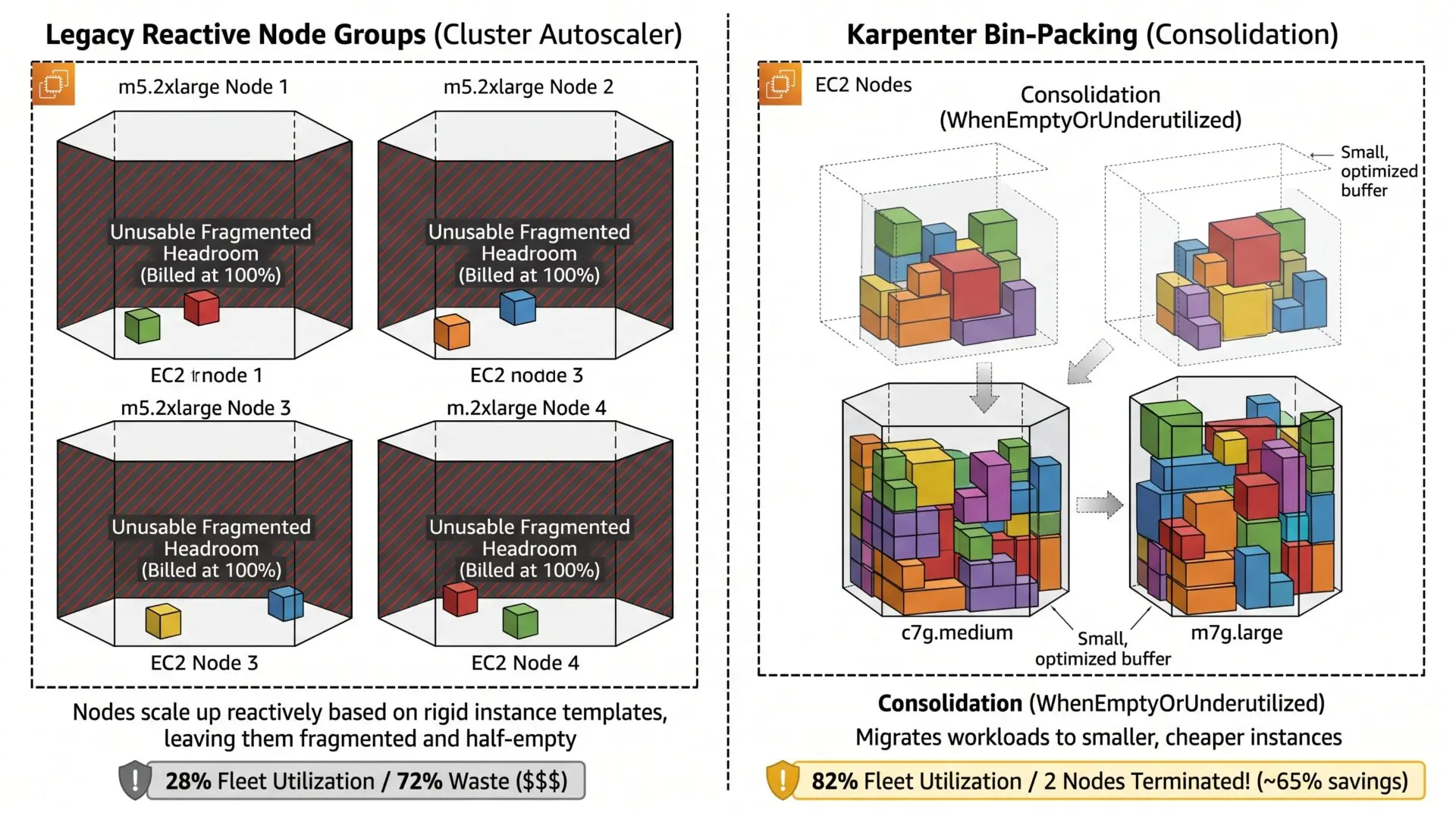
The traditional Kubernetes Cluster Autoscaler (CAS) scales a cluster by adding or removing nodes from AWS Auto Scaling Groups (ASGs). When a pod enters a ‘Pending’ state because no existing node has enough allocatable resources, CAS triggers an ASG to launch another EC2 instance.
In fairness to CAS, two of the usual criticisms don’t hold up:
- ASGs are not locked to a single instance type. They support mixed-instances policies, and managed node groups accept several instance types.
- CAS does scale down. By default it removes a node once the sum of its pod requests drops below roughly 50% of the node’s capacity.
The real limitation is narrower but costly: CAS assumes every node within a group shares the same CPU and memory shape, so it cannot pick a smaller, cheaper instance tailored to a specific pending pod, and it cannot replace an existing node with a cheaper type.
As pods of varying sizes scale up and down across Availability Zones, the cluster fragments: you can end up running many instances that are heavily reserved by requests yet lightly used, where no single node has enough requestable room left for the next pod.
Published Kubernetes utilization surveys (for example, the annual reports from Datadog and CAST AI) consistently put average cluster CPU utilization low, frequently in the 10–30% range. These are industry-wide averages, so measure your own cluster before drawing conclusions.
Note that this fragmentation is a requests problem, not purely a usage problem. A node can read 70% idle on actual CPU and still refuse a new pod because its requests are already fully booked. That inflated-request issue is the subject of the next section; here, the fix is giving the autoscaler freedom to choose the right instance shape.
The Fix: Karpenter Dynamic Provisioning and Consolidation
Replace Cluster Autoscaler with Karpenter. Karpenter bypasses ASGs, calling the EC2 Fleet APIs directly to launch right-sized compute matched to the exact requests of pending pods.
Its consolidation policy (WhenEmptyOrUnderutilized) then continuously repacks the cluster: as pods scale down, Karpenter reschedules the survivors onto fewer nodes and swaps large nodes for cheaper, smaller ones, the move CAS cannot make.
apiVersion: karpenter.sh/v1
kind: NodePool
metadata:
  name: general-compute
spec:
  # FinOps Fix: A hard ceiling so a runaway workload can't scale the fleet without bound.
  limits:
    cpu: "1000"
    memory: 1000Gi
  template:
    spec:
      nodeClassRef:
        group: karpenter.k8s.aws
        kind: EC2NodeClass
        name: default
      requirements:
        # Allow BOTH arm64 and amd64. Graviton (arm64) is cheaper, but a pod whose
        # image has no arm64 build will crash with "exec format error". Only pin
        # arm64 if you have confirmed every image is multi-arch.
        - key: kubernetes.io/arch
          operator: In
          values: ["arm64", "amd64"]
        - key: karpenter.sh/capacity-type
          operator: In
          values: ["spot", "on-demand"]
        - key: karpenter.k8s.aws/instance-category
          operator: In
          values: ["c", "m", "r"]
  disruption:
    # Repacks the cluster and swaps oversized nodes for cheaper ones.
    consolidationPolicy: WhenEmptyOrUnderutilized
    consolidateAfter: 1m
    # Cap how much consolidation churn happens at once.
    budgets:
      - nodes: "10%"
Before rolling this out, put two safeguards in place. First, running Spot with aggressive consolidation needs the supporting machinery in place: the Spot interruption SQS queue wired to Karpenter, PodDisruptionBudgets on your workloads, and disruption budgets (above) to bound churn.
Spot-to-Spot consolidation in particular needs broad instance-type flexibility and may sit behind a feature flag depending on your Karpenter version. Second, if you would rather not operate Karpenter yourself, EKS Auto Mode runs an AWS-managed Karpenter for you and is worth evaluating as the lower-effort alternative.
Resource Request Hoarding (The “Phantom Core” Problem)
In Kubernetes, pod manifests define requests (what the scheduler guarantees before binding a pod to a node) and limits (the ceiling a container cannot exceed).
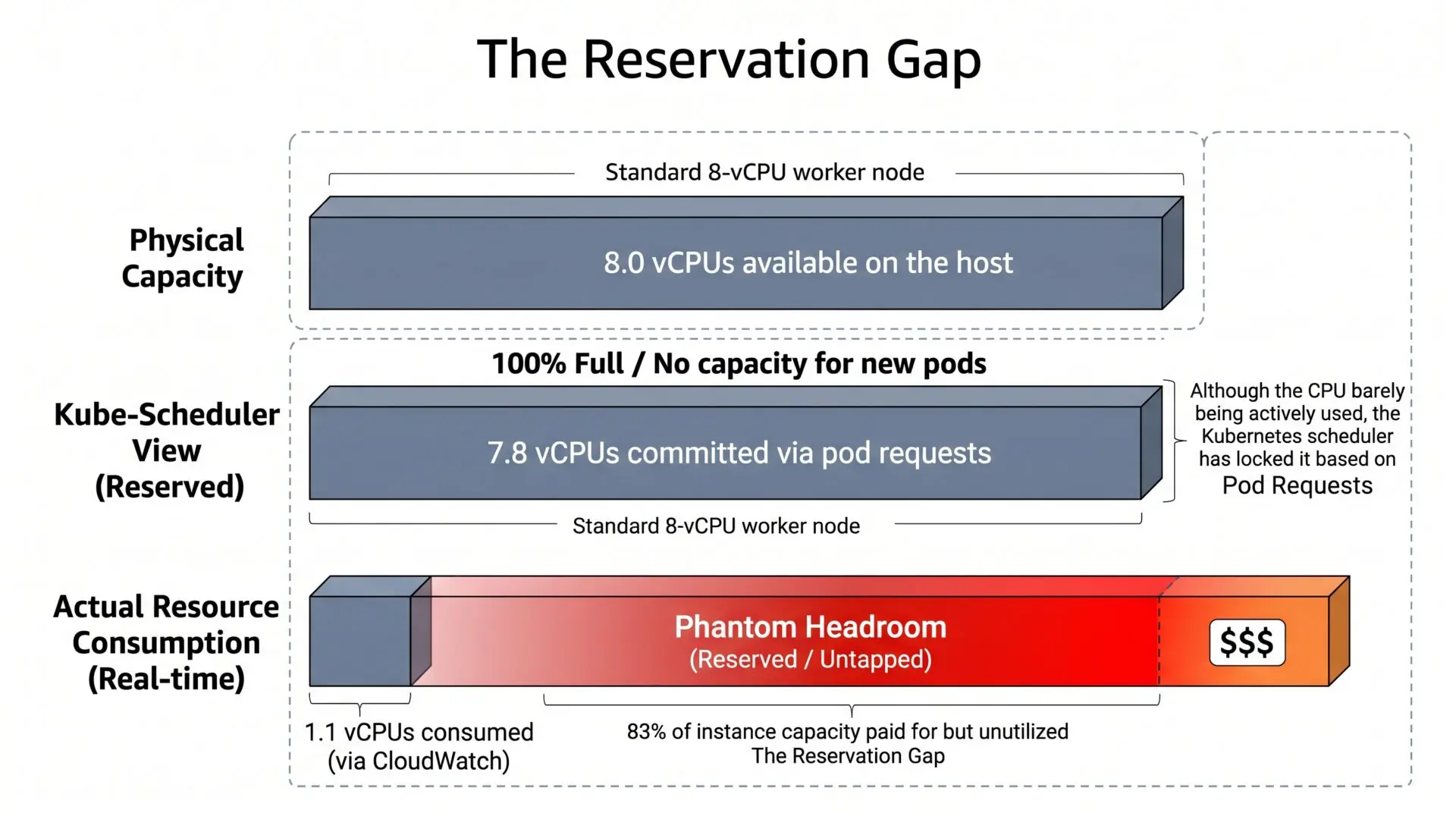
The scheduler makes 100% of its placement decisions on requests and ignores real-time utilization. If a developer requests cpu: 2000m and memory: 4Gi as a defensive buffer but the container averages 100m CPU and 400 MiB in production, the scheduler treats that slice of the node as fully booked.
The host sits nearly idle, yet the next pod can’t be placed and triggers a scale-out. This is the inflated-request fragmentation the previous section referred to, and in most clusters, no other issue creates as much ghost capacity.
The Fix: Right-Size Requests to Production Telemetry (CPU and Memory Differently)
Audit real consumption with the Kubernetes Vertical Pod Autoscaler (VPA) in recommendation mode (updateMode: “Off”) or with CloudWatch Container Insights.
Then size the two resources by different rules, because they fail in opposite ways:
- CPU is compressible. If a container briefly needs more CPU than it requested, it gets throttled, not killed. So size the CPU request to roughly p95 of real usage, and it is usually fine to leave the CPU limit high or unset to allow bursts.
- Memory is not compressible. A container that exceeds its memory gets OOM-killed, and if limits are overcommitted across a node, pods get evicted under memory pressure. So size the memory request to near the real peak, and set the memory limit equal to the request. Do not run memory with a low request and a 2x limit.
apiVersion: apps/v1
kind: Deployment
metadata:
  name: order-processing-service
spec:
  template:
    spec:
      containers:
        - name: app
          image: order-processor:v2.1
          resources:
            requests:
              cpu: "150m"       # CPU: ~p95 of real usage (compressible; throttles, not killed)
              memory: "512Mi"   # Memory: near real PEAK (not compressible; OOM-kills)
            limits:
              cpu: "1000m"      # CPU limit high (or omit) to allow bursts
              memory: "512Mi"   # Memory limit == request to avoid overcommit evictions
One word of caution. If a Horizontal Pod Autoscaler (HPA) already scales this workload on CPU or memory, do not also let VPA act on the same resource. The two will fight. Use VPA in recommendation-only mode here, or split responsibilities (VPA on memory, HPA on CPU).
The Multi-Tenant Black Box (Attributing Shared Cluster Cost)
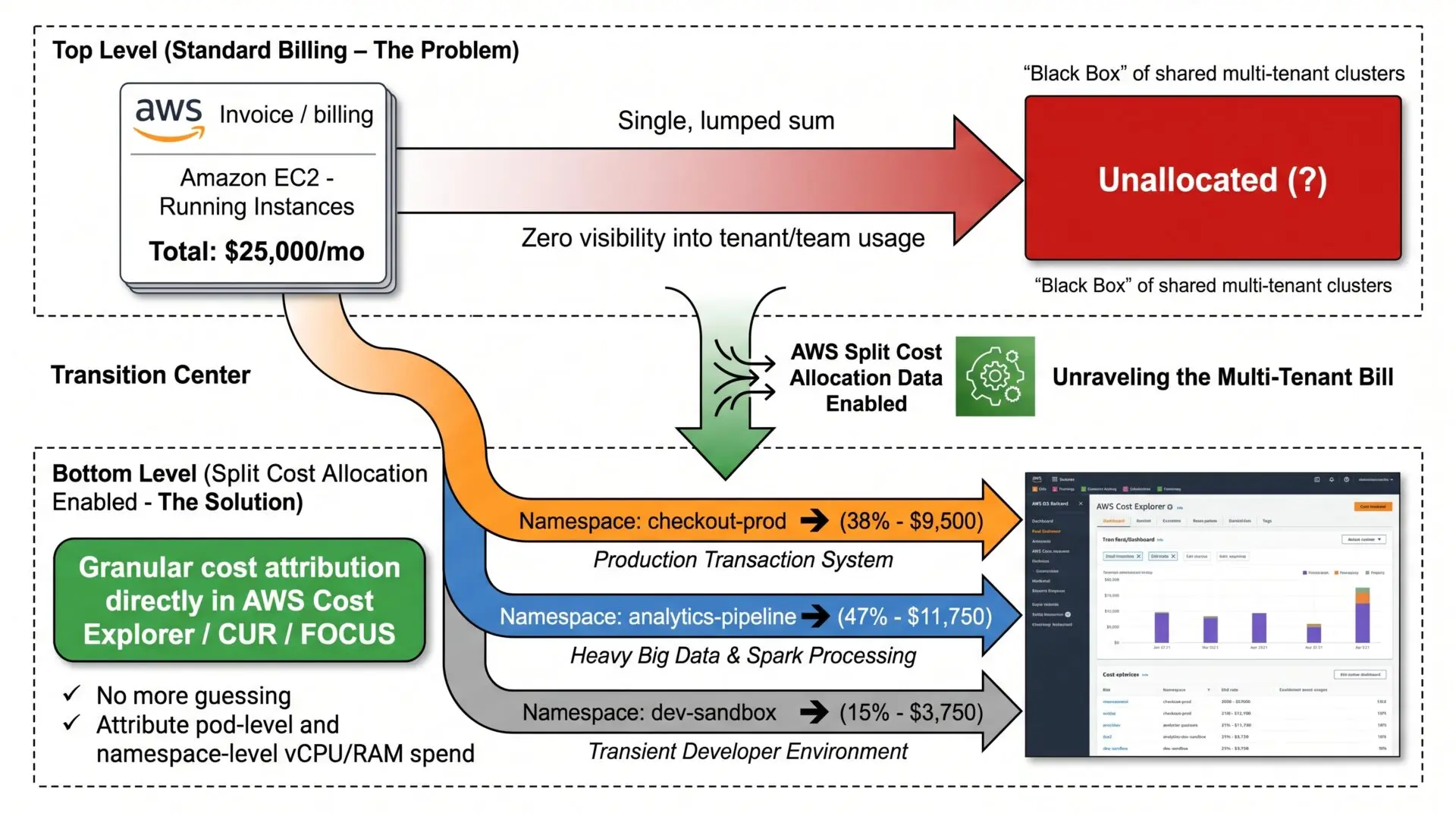
When multiple teams or services share an EKS cluster, the AWS invoice shows only the underlying EC2 instances, EBS volumes, load balancers, and the EKS control-plane fee. It does not say which namespace or workload drove a spend increase, so teams treat shared cluster compute as free.
The Fix: Enable AWS Split Cost Allocation Data for EKS
AWS provides Split Cost Allocation Data for EKS natively, no third-party agent required.
It attributes shared EC2 and EBS cost down to the individual pod, which you can then roll up by Kubernetes namespace and workload.
Two things to get right, because both are easy to misstate:
1. Understand what it charges each pod, and what actually reveals waste. By default, Split Cost Allocation splits cost using each pod’s CPU and memory requests. If you feed it utilization metrics (via CloudWatch Container Insights or Amazon Managed Service for Prometheus), it allocates by the higher of a pod’s requests and its actual usage.
So a pod that requests 2000m and uses 100m is still charged for 2000m either way; usage only changes the bill when a pod bursts above its request. In other words, Split Cost Allocation does not, on its own, reveal over-provisioning by showing “true consumption.”
What exposes the gap is the split_line_item_unused_cost column (the cost of reserved-but-unused capacity), read alongside the VPA recommendations from the previous section. Use the allocation to assign cost to a namespace; use unused-cost plus VPA to find the waste inside it.
2. This is a CUR 2.0 / Data Exports feature, not a Cost Explorer one. Pod-level splits surface in the Cost and Usage Report, not in the Cost Explorer console.
And the export has to be configured correctly or the split columns and the namespace grouping simply won’t exist:
- Enabling Split Cost Allocation is a one-time opt-in in the Billing & Cost Management console (Cost Management → Preferences), done by the management/payer account. There is no aws ce command for it.
- The CUR 2.0 export must set RefreshCadence, include the split-cost table configuration, and (crucially) select resource_tags — that nested column is where aws:eks:namespace and aws:eks:workload-name live. Without it, you cannot group by namespace.
# Install the CloudWatch Container Insights add-on so Split Cost Allocation
# can also allocate on utilization for pods that burst above their requests.
aws eks create-addon \
  --cluster-name "production-cluster" \
  --addon-name "amazon-cloudwatch-observability"

# Create a CUR 2.0 export WITH split cost allocation data and the EKS tags.
aws bcm-data-exports create-export --export file://eks-split-cost-export.json

{
  "Name": "EKS-Split-Cost-Export",
  "Description": "CUR 2.0 export with EKS split cost allocation data and namespace tags",
  "DataQuery": {
    "QueryStatement": "SELECT line_item_usage_account_id, line_item_resource_id, split_line_item_split_cost, split_line_item_unused_cost, resource_tags FROM COST_AND_USAGE_REPORT",
    "TableConfigurations": {
      "COST_AND_USAGE_REPORT": {
        "INCLUDE_SPLIT_COST_ALLOCATION_DATA": "TRUE",
        "TIME_GRANULARITY": "DAILY"
      }
    }
  },
  "DestinationConfigurations": {
    "S3Destination": {
      "S3Bucket": "my-cur-export-bucket",
      "S3Prefix": "eks-split-cost",
      "S3Region": "us-east-1",
      "S3OutputConfigurations": {
        "OutputType": "CUSTOM",
        "Format": "PARQUET",
        "Compression": "PARQUET",
        "Overwrite": "OVERWRITE_REPORT"
      }
    }
  },
  "RefreshCadence": { "Frequency": "SYNCHRONOUS" }
}
Note: Container Insights with Enhanced Observability is not free — it is billed per observation — so weigh that cost against the visibility, especially on large clusters.
Also Worth Checking
Fixing the three traps above keeps a cluster tidy. But on a mature EKS bill, the following line items are often larger than all three put together:
- EKS Extended Support. When your Kubernetes version leaves standard support, the control-plane fee jumps from $0.10 to $0.60 per cluster-hour: 6x, about $4,380 per cluster per year. Staying current is the EKS counterpart of the RDS Extended Support trap, and on many bills it outweighs everything else in this list.
- Cross-AZ data transfer, NAT gateways, and load balancers. The invoice does not label these “EKS,” but chatty pods spread across AZs, per-GB NAT processing, and per-ALB/NLB charges are often the real hidden cost of a cluster. (Topology Aware Routing and VPC endpoints are the usual fixes.)
- Savings Plans coverage. The node fleet is EC2, so Compute Savings Plans apply to it. Cover your steady-state baseline and let Spot/on-demand handle the burst.
Conclusion
Maximizing the ROI of containerized infrastructure is not about starving microservices of the compute they need to stay resilient. It is about closing the gap between what pods reserve and what they actually use.
Give the autoscaler freedom to pick the right instance (Karpenter, or EKS Auto Mode). Size requests to real telemetry, memory to peak and CPU to p95. Attribute shared cost with Split Cost Allocation, and find the waste inside each namespace with unused-cost columns and VPA. Then check the bigger levers: Extended Support, cross-AZ transfer, and Savings Plans.
Stop paying for reservations. Make every container justify its footprint.
Scale with Automat-it FinOps
Speak with Tamir and the Automat-it FinOps team to benefit from cost optimization built on years of AWS expertise and experience working with similar companies.
